Wait, that’s prod!

Ambient borders, hanging tabs, and a conscious confirmation fuse for the moment right before you drop a live database.

Free · No account · Zero network requests

STEP 1 OF 3 · THE MISTAKE You are sure this tab is Staging. Drop the stale replica, pg-replica-02.
https:// console.acme-cloud.io /clusters/db-replica-02
Acme Cloud Console
PostgreSQL 16.4 High-Availability
Cluster Node Engine Status Actions
pg-replica-01 PostgreSQL 16.4 ● Healthy (38% CPU)
pg-replica-02 PostgreSQL 16.4 ● Stale (0% CPU)
How It Works

Built for the engineer with 40 tabs open

Three small pieces, one job: make production impossible to confuse with anything else.

1. See It

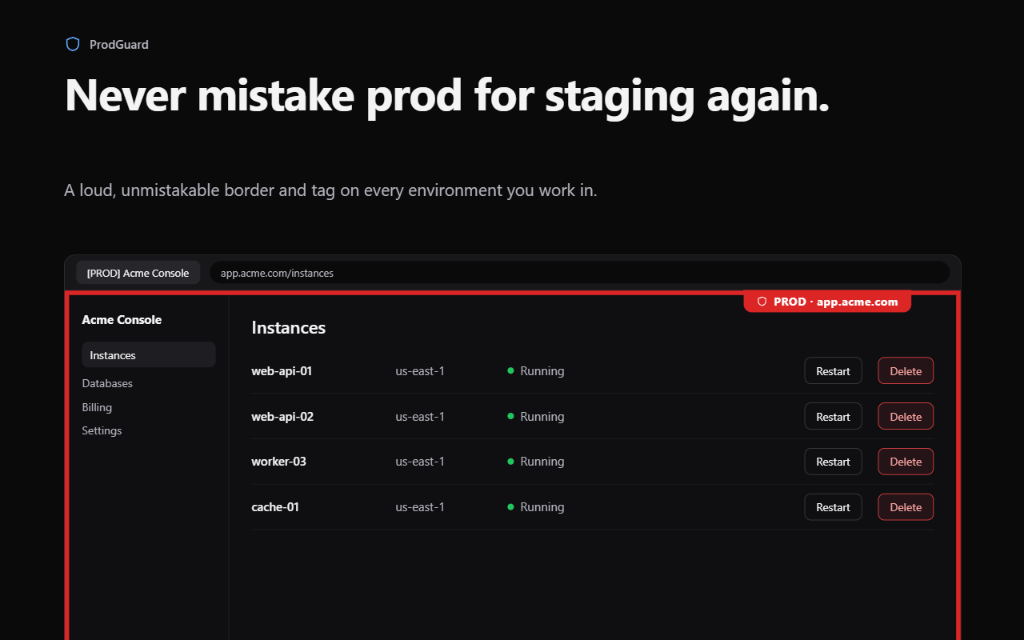
Never mistake prod for staging again

High-visibility glowing borders surround the entire browser viewport on production tabs. The tab title is automatically prefixed with [PROD] so you distinguish tabs in your browser bar before you even click them.

High visibility glowing borders on production console
2. Tag It

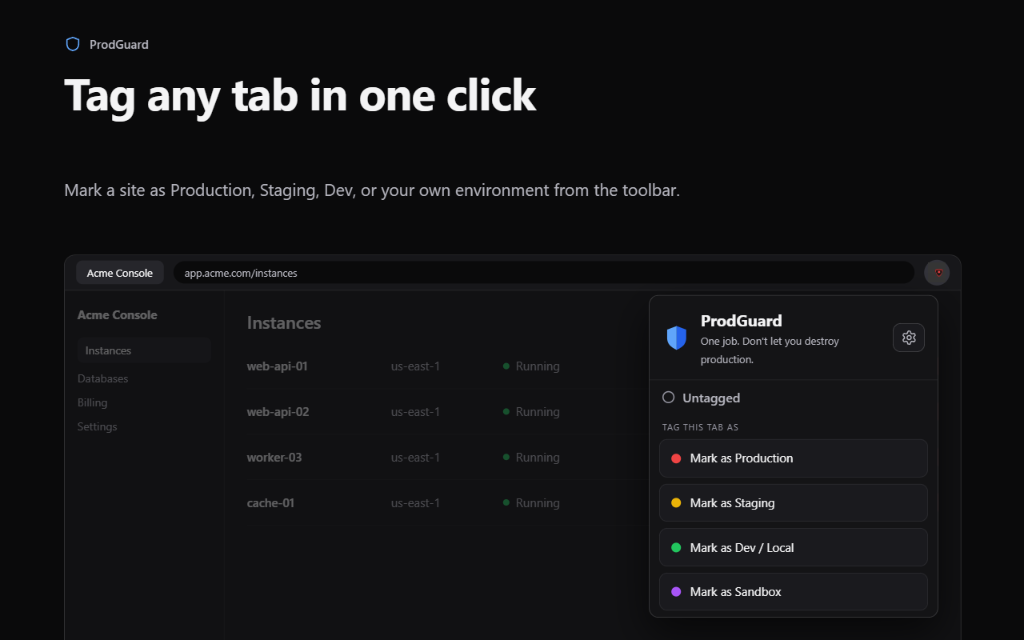
Tag any tab in one click

No complex configuration files or regex mastery required. Click the shield in your toolbar and mark any site as Production, Staging, Dev / Local, or Sandbox in real time without refreshing the page.

One click tab tagging in extension popup
3. Stop It

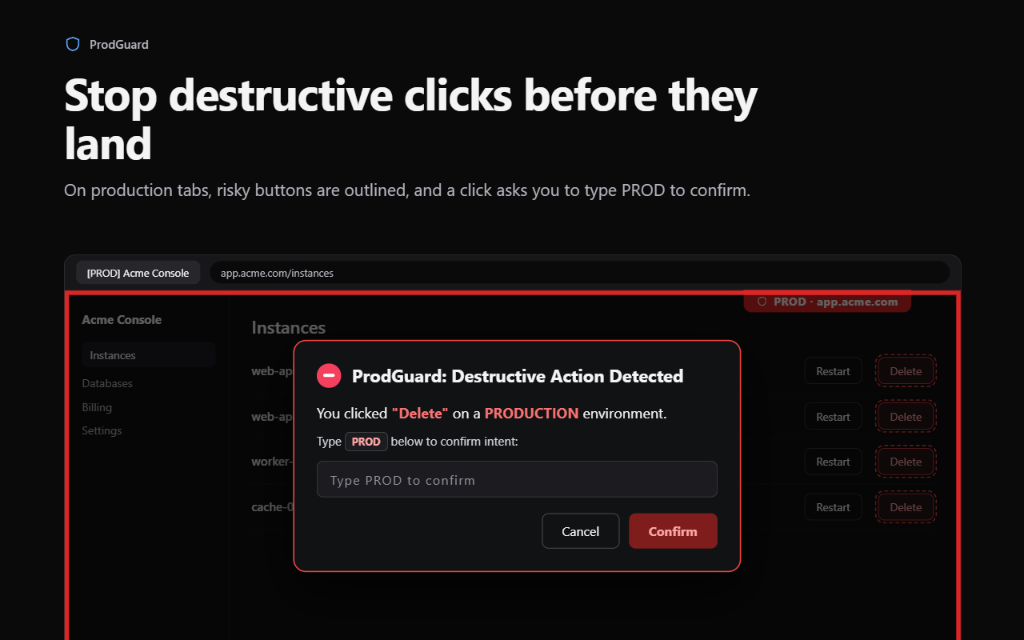
Stop destructive clicks before they land

On production tabs, dangerous buttons (Delete, Drop, Purge, Terminate, Destroy) are armed with click interceptors. Clicks are held in the capture phase, requiring deliberate keyboard confirmation: type PROD to disarm.

The FUSE click interception confirmation modal
For Teams

Granular control across every cloud service

Adapt Wait, That’s Prod! to your organization's custom environments and wildcard routing.

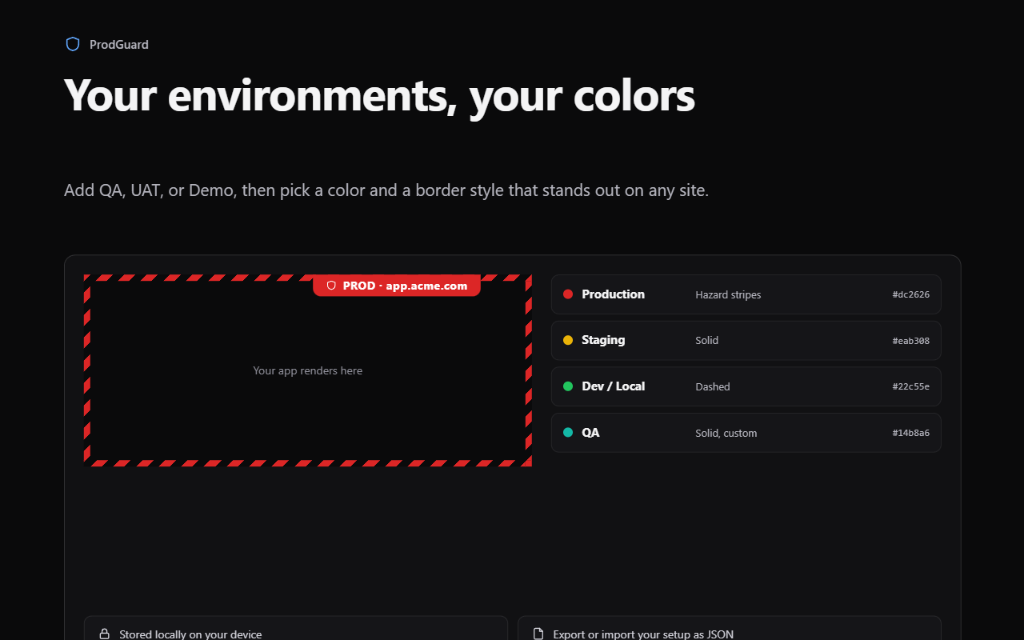
Your environments, your colors

Create custom environments like QA, UAT, or Sandbox. Perceptual clash detection warns you if a staging color looks identical to production, while side-by-side previews ensure contrast on both dark and light consoles.

Color clash detection and custom environments

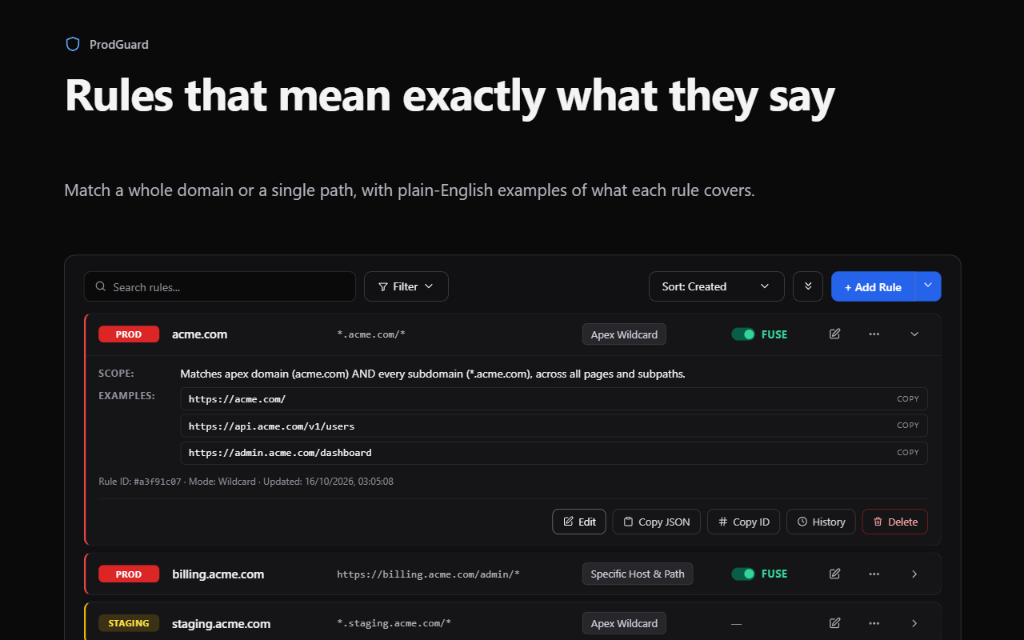
Rules that mean exactly what they say

Wait, That’s Prod! translates technical wildcards and regex expressions into plain-English scope sentences, complete with copyable real-world URL examples so you never guess what a rule covers.

Plain English scope explanations and URL examples
Security & Architecture

Runs entirely on your machine

Wait, That’s Prod! is built on a strict zero-telemetry guarantee. Your internal URLs and infrastructure details never leave your browser.

Zero Network Calls

Verified zero fetch, XMLHttpRequest, or WebSocket instances across all source code. 100% offline.

No Form Harvesting

Content scripts inspect button labels only. They never read password fields, auth tokens, or form inputs.

Local Storage Only

All rules, tag history, and custom environments are stored exclusively on your device in chrome.storage.local.

Release History

Changelog & Updates

Track every enhancement, safeguard, and security update shipped to Wait, That’s Prod!.

v1.0.0 Latest

Initial Release · The Production Shield

First public release submitted to the Chrome Web Store. Complete ambient visual warning system, destructive click interception, and zero-telemetry local architecture.

  • New
    Ambient Viewport Borders: Full-screen high-salience colored borders (solid, dashed, hazard stripes) that make production tabs unmissable.
  • New
    Hanging File Tab & Ghost Mode: Physical hanging tab mounted flush to the top edge. Fades to 8% opacity on hover so clicks pass straight through to covered buttons.
  • New
    Destructive Action Fuse: Modal confirmation intercept that halts accidental clicks on dangerous buttons (Drop, Delete, Terminate) until confirmed by typing the environment name.
  • New
    Plain-English Rule Explanations: Technical regex and wildcard rules are translated into human-readable scope sentences with copyable test URL examples.
  • Security
    Air-Gapped Privacy Architecture: Zero background network calls (fetch, XHR, WebSocket), zero telemetry, and 100% offline local storage (chrome.storage.local).
FAQ

Frequently asked questions

Which browsers does Wait, That’s Prod! support?

Chrome and other Chromium-based browsers, including Edge and Brave. Install it from the Chrome Web Store.

Does Wait, That’s Prod! work on Single-Page Apps (React, Next.js, Vue)?

Yes. Wait, That’s Prod! hooks into the browser History API (pushState and replaceState) and the popstate event. Client-side route changes update environment badges instantly without page refreshes.

What is "Ghost Mode"?

Floating badges can occasionally obscure underlying buttons. In Wait, That’s Prod!, hovering your cursor over any badge fades its opacity to 8% and passes clicks straight through to the underlying page.

Will Wait, That’s Prod! slow down my browser?

No. Wait, That’s Prod! uses native DOM APIs and debounced observers. Matching rules are evaluated in memory against pre-compiled regexes, taking sub-millisecond execution time.

Protect your production environments today

One extension. Ambient borders and click interception that keep your cloud safe.

● In Chrome Web Store Review